

***NOTE: The rounding logic in EmpCenter changed on February 2nd, 2014. Below are the details for the current rounding logic. Click here for details on the old rounding logic prior to 2/2/14.***
EmpCenter rounds each clock or work in/out slice to the nearest quarter (.25) hour to give clocking employees some leeway when clocking in and out.
Example: employee clocks in at 7:58 am and clocks out at 5:02 pm with an hour lunch. The employee worked 8.07 hours (after converting the 4 minutes to decimal (4/60=.07) and subtracting out the hour lunch). With rounding to the quarter hour, the employee will be paid for 8 hours. See the table below for conversions:
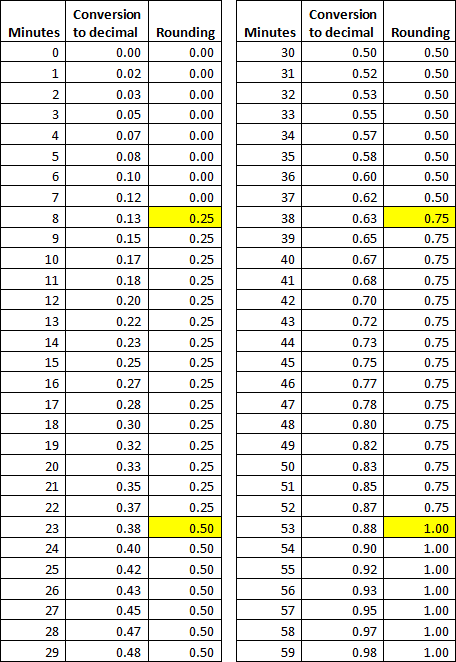
Please note, the rounding logic will be applied to each clock or work in/out slice for the day, not to the total hours for the day.
***The rounding logic described below was in place for all time entry prior to February 2, 2014.***
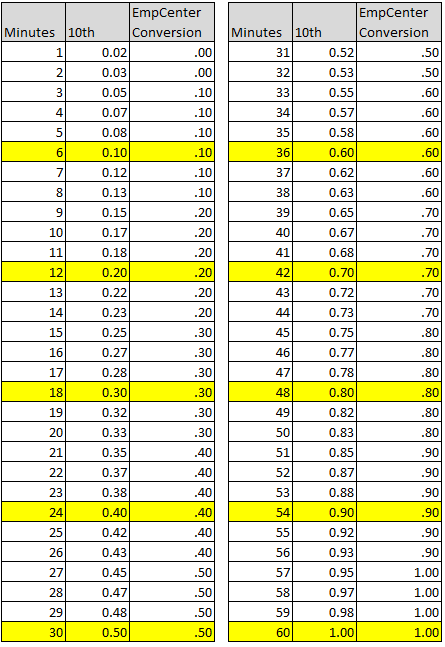
EmpCenter is programmed with some leeway. For each clock in/out slice, EmpCenter will round to the nearest 10th of the hour after subtracting out the meal.
For example, you clock in at 7:58 am and clock out at 5:00 pm and take a 1 hour meal, a total of 8 hours and 2 minutes for the day. EmpCenter will convert the 2 minutes to .03 (2/60=.03, for a total of 8.03 hours) and will round down to 8 hours. If you clock in at 8:01 am and clock out at 5:04 pm for a total of 8 hours and 3 minutes, EmpCenter will convert the 3 minutes to .05 (3/60=.05) and round up to 8.10 hours.

Minute conversion chart:
tags: clocking, rounding, totals, overtime, ot